


Running an ice cream shop means managing anywhere from 3 to 12 pieces of refrigeration equipment that all hate each other. Your display freezer runs at -5°F, your soft-serve machine needs 18-20°F in the hopper, your walk-in sits at -10°F, and your blast freezer drops to -40°F. Each unit has different maintenance needs, different failure patterns, and they all decide to break at the worst possible moments.
Most shops treat equipment maintenance like putting out fires. The soft-serve machine starts pulling weird, check the belts. Display freezer sounds louder than usual, maybe clean the condenser. Walk-in door seal looks wonky, tape it up until slower season. This reactive approach costs shops between $8,000 and $15,000 annually in emergency repairs, product loss, and energy waste—and those are the lucky ones who don't lose a whole walk-in during a July heatwave.
The real problem isn't the equipment. It's that nobody teaches you how to run multiple freezer units as an integrated system. Your equipment vendor gives you a manual for each unit. Your HVAC guy shows up when something breaks. Your electric bill keeps climbing. Meanwhile, you're trying to figure out why your soft-serve machine conks out every third Thursday and your display freezer ices up whenever it rains.
The hidden coordination problem
After watching hundreds of shops deal with equipment failures, the pattern becomes obvious. It's not that individual freezers fail—it's that the whole system degrades together, and nobody notices until something expensive breaks.
Take a typical 1,200 square foot scoop shop. You've got a 3-door display freezer pulling 8.5 amps continuously, two soft-serve machines cycling between 12 and 18 amps each, a walk-in compressor that kicks on every 20 minutes drawing 15 amps, plus reach-ins and a blast freezer. On paper, your electrical panel can handle it. In reality, when everything cycles on simultaneously during a 95-degree afternoon, you're pulling 85% of panel capacity and nobody knows it.
The soft-serve machine starts cutting out first—not because it's broken, but because voltage drops when everything else kicks on. You call the soft-serve tech, pay $200 for a service call, they find nothing wrong. Two weeks later, same problem. Meanwhile, your display freezer compressor is working 30% harder to compensate for the voltage fluctuations, shaving 2-3 years off its lifespan.
This cascade effect shows up everywhere. Your walk-in door seal degrades slightly, causing the compressor to run more frequently. The extra heat from the compressor raises ambient temperature near your soft-serve machines. Those compressors work harder, pull more power, generate more heat. Your display freezer drops efficiency by 15-20%. Your energy bill jumps $300 that month and you blame the weather.
Building a freezer maintenance checklist ice cream shop owners actually follow
The standard approach—annual service contracts plus emergency calls—misses roughly 80% of preventable failures. You need daily, weekly, and monthly routines that catch problems while they're still cheap to fix. More importantly, routines that actually happen, which means they need to fit within your existing operational flow.
Keep your ice cream shop running smoothly.
Cremyly helps you manage every order, stock level, and staff shift with precision and ease.
- Real-time inventory tracking
- Order management dashboard
- Staff scheduling & shift coordination
No credit card required
Daily 3-minute diagnostic round
Every morning, before the first customer walks in, someone needs to check five things across all units. Not deep inspections—just quick health checks that catch problems early.
| Check | Notes |
|---|---|
| Temperature variance from set point | Temperature variance from set point tells you about compressor health. If your display freezer usually holds -5°F but starts floating to -3°F, something's degrading. Could be a door seal, could be condenser buildup, could be refrigerant loss starting. The key is catching it at -3°F, not waiting until it hits 0°F and melts $800 worth of pints. |
| Listen for cycle timing changes | Listen for cycle timing changes. A healthy walk-in compressor runs about 12 minutes, then rests for 8-10 minutes in normal conditions. When that shifts to 15 minutes on and 5 minutes off, something's developing. Usually means your condenser needs cleaning or your refrigerant charge is dropping. |
| Product consistency for soft-serve | Soft-serve machines tell you they're dying through product consistency. When your vanilla starts pulling slightly softer than your chocolate from identical machines with identical settings, one machine's refrigeration is degrading. Product is still serveable, customers won't complain yet, but you've got maybe two weeks before it starts throwing temperature errors. |
| Door seal check (dollar bill test) | Check door seals with the dollar bill test—close a bill in the door, if it slides out easily, your seal is shot. Do this daily on high-traffic freezers because a bad seal costs $20-40 per month in extra energy plus accelerated compressor wear. |
| New sounds from compressors | Note any new sounds from compressors. A healthy compressor hums steadily. Any clicking, grinding, or changes in pitch mean something's wearing out. That sound appears weeks before actual failure. |
Temperature variance from set point tells you about compressor health. If your display freezer usually holds -5°F but starts floating to -3°F, something's degrading. Could be a door seal, could be condenser buildup, could be refrigerant loss starting. The key is catching it at -3°F, not waiting until it hits 0°F and melts $800 worth of pints.
Listen for cycle timing changes. A healthy walk-in compressor runs about 12 minutes, then rests for 8-10 minutes in normal conditions. When that shifts to 15 minutes on and 5 minutes off, something's developing. Usually means your condenser needs cleaning or your refrigerant charge is dropping.
Soft-serve machines tell you they're dying through product consistency. When your vanilla starts pulling slightly softer than your chocolate from identical machines with identical settings, one machine's refrigeration is degrading. Product is still serveable, customers won't complain yet, but you've got maybe two weeks before it starts throwing temperature errors.
Check door seals with the dollar bill test—close a bill in the door, if it slides out easily, your seal is shot. Do this daily on high-traffic freezers because a bad seal costs $20-40 per month in extra energy plus accelerated compressor wear.
Note any new sounds from compressors. A healthy compressor hums steadily. Any clicking, grinding, or changes in pitch mean something's wearing out. That sound appears weeks before actual failure.
Weekly 15-minute prevention blocks
Pick a slow afternoon—usually Tuesday or Wednesday—and run through deeper checks that prevent the expensive failures.
Clean all accessible condensers with a soft brush or vacuum. Dirty condensers cause about half of summer equipment failures and increase energy consumption by 25-30%. A clean condenser runs 10-15 degrees cooler than a dirty one, which translates directly to compressor lifespan.
For soft-serve machines, check and clean the scraper blades. Worn blades don't just affect product quality—they make the compressor work harder to maintain temperature, pulling an extra 2-3 amps continuously. That's $30-40 monthly in unnecessary power consumption per machine.
Document amperage draws for each unit using a clamp meter (around $40). A display freezer pulling 9 amps when it used to pull 8 means something's wrong—either the compressor's struggling, refrigerant's low, or the condenser's dirty. You want to catch it at 9 amps, not at 11 when the compressor burns out.
Verify defrost cycles are completing properly. Ice buildup happens gradually—1mm per day doesn't seem like much until you've got an inch of ice insulating your evaporator coils and your freezer can't hold temperature. Check that defrost heaters actually melt all ice and that drain pans empty completely.
Test emergency alarm systems. Your temperature alarms should trigger at specific thresholds—usually 10 degrees above set point. But alarms fail silently. Test them weekly by temporarily adjusting setpoints to trigger them, then verify you actually receive the alert on your phone.
Monthly deep-dive maintenance
Once a month, schedule about 2 hours for comprehensive equipment checks.
Pull out freezers and clean behind them completely. Dust and debris that accumulates back there acts like insulation, trapping heat and forcing compressors to run 20-30% more than necessary. One shop cut their summer electricity bill by $400 just by establishing monthly behind-freezer cleaning.
Check refrigerant sight glasses on all units. Bubbles mean low refrigerant, which means a leak somewhere. A slow leak costs $50-100 monthly in extra electricity as the compressor struggles to maintain temperature with insufficient refrigerant. And when refrigerant gets too low, compressors overheat and fail—that's a $3,000-5,000 replacement.
Inspect and clean evaporator coils inside freezers. Dirty evaporators reduce cooling capacity by up to 40%. Use a soft brush and mild detergent, never harsh chemicals that could corrode aluminum fins. While you're in there, check that evaporator fans spin freely and quietly.
Calibrate all thermostats using a certified thermometer. Digital controllers drift over time. When your controller reads -5°F but actual temperature is -2°F, you're slowly melting inventory. Calibration takes 5 minutes per unit.
Review energy consumption patterns. Your smart meter data or energy monitoring system should show consistent patterns. Sudden increases usually mean equipment degradation—one soft-serve machine pulling 20% more power than its twin indicates failing components, even if it's still running.
Seasonal cadence adjustments that actually matter
Your freezer maintenance checklist ice cream shop equipment faces completely different stresses in July versus January. Standard maintenance schedules ignore this, which is why equipment fails predictably every summer.
Pre-summer preparation (April-May)
Before heat stress begins, every piece of equipment needs optimization. Clean condensers aren't enough—you need to prepare for three months of continuous high-load operation.
Replace door gaskets preemptively on high-traffic units. A marginal seal that works fine in 60-degree weather will fail at 95 degrees when the pressure differential increases. New gaskets cost $50-150. Emergency replacement during a heat wave costs triple, plus product loss.
Verify refrigerant charges are at manufacturer specs. Most systems lose 2-5% of refrigerant annually through microscopic leaks. That missing 5% doesn't matter in winter but causes compressor failure in summer heat. Top off in May when HVAC techs aren't slammed with emergency calls.
Adjust defrost cycles for summer humidity. High humidity means more frequent defrost cycles—typically every 4 hours instead of every 6. But longer defrost duration risks product temperature rise. Find the sweet spot for your climate: frequent but brief defrost cycles.
Install temporary shade for outdoor condensers. Direct sun raises operating temperature by 10-15 degrees. A simple shade canopy drops operating costs by around 10% and extends compressor life. Remove it in winter so snow doesn't accumulate.
Summer operations (June-August)
During peak season, everything runs harder and margins for error disappear.
Clean condensers weekly, not monthly. Dust, pollen, and cottonwood seeds accumulate fast in summer. A study of 50 ice cream shops found that weekly condenser cleaning during summer reduced equipment failures by 60% and energy costs by 18%.
Monitor amp draws daily during heat waves. When ambient temperature exceeds 90°F, compressors pull 15-25% more current. If you're already near panel capacity, this triggers breakers. Document baseline draws on cool mornings, then check during afternoon peaks.
Run soft-serve machines slightly colder than normal—18°F instead of 20°F—to provide buffer for afternoon heat. Product stays in safe serving range even when machines struggle with heat load. Customers won't notice 2 degrees of difference, but it prevents those 3pm temperature alarms.
Schedule preventive maintenance for early morning, never afternoon. Shutting down equipment during peak heat stress can prevent it from restarting properly. One shop learned this the hard way after their walk-in wouldn't restart following 2pm maintenance on a 98-degree day—lost $3,000 in product.
Fall adjustment (September-October)
As temperatures drop and business slows, it's time to assess summer damage and prepare for winter.
Inspect all compressors for heat damage—discoloration, oil leaks, unusual wear patterns. Compressors that survived summer might still have reduced lifespan. Better to replace in October than during December holidays.
Recalibrate all controls after summer stress. Electronic controls drift more during extreme temperature cycles. One chain found their freezers averaged 3 degrees warmer than set points after summer, wasting $200 monthly per location in excess energy.
Deep-clean evaporators that worked overtime all summer. The combination of high humidity and constant operation creates biofilm buildup that reduces efficiency and causes odor problems. Use EPA-approved coil cleaners and rinse thoroughly.
Winter optimization (November-March)
Lower ambient temperatures mean equipment runs more efficiently, but new problems emerge.
Adjust defrost schedules for lower humidity—every 8-12 hours instead of every 4-6. Unnecessary defrost cycles waste energy and create temperature fluctuations that degrade product quality.
Verify condensers have adequate airflow despite snow accumulation. Blocked condensers cause winter compressor failures just like summer heat does. Install wind barriers that prevent snow accumulation while maintaining airflow.
Monitor for short-cycling in cold weather. When outdoor condensers get too cold, refrigerant doesn't evaporate properly, causing compressors to rapid-cycle. Installing low-ambient controls prevents this and extends compressor life by years.
Energy monitoring that pays for itself
Most shops spend $2,000-4,000 monthly on electricity, with refrigeration consuming 60-70% of that. But almost nobody tracks individual equipment consumption, so inefficiencies hide in the total bill until equipment fails completely.
Installing basic energy monitoring reveals problems weeks before they cause failures. Smart plugs with energy monitoring cost $25-40 each. Dedicated circuit monitors run $100-200. For a typical shop with 8 refrigeration units, you're looking at $400-800 total investment that pays back in 2-3 months through prevented failures and reduced consumption.
Document baseline amp draws on cool mornings so you can spot afternoon spikes during heat waves.
The patterns tell you everything. A display freezer normally pulling 8.5 amps should stay within 0.5 amps of that baseline. When consumption creeps to 9 amps, then 9.5, you know something's degrading. Usually condenser buildup or refrigerant loss—both easy fixes if caught early.
Soft-serve machines show deterioration through duty cycle changes. A healthy machine runs the compressor around 60% of the time in summer. When that increases to 70%, then 80%, problems are developing. Could be gasket leaks, refrigerant loss, or scraper blade wear. The energy data points you toward the problem before customers notice quality issues.
Walk-in freezers reveal door seal problems through increased runtime. A good seal means the compressor runs roughly 20 minutes per hour in stable conditions. Bad seals push that to 30-35 minutes—that's $100-150 monthly in wasted electricity, plus accelerated compressor wear.
Energy consumption increases gradually before equipment fails catastrophically. That gradual increase is your early warning system, but only if you're actually monitoring it.
Emergency response templates that prevent panic decisions
When equipment fails during Saturday afternoon rush, panic leads to expensive mistakes. You need predetermined responses that anyone can execute without thinking.
Display freezer failure response
First 15 minutes: Move product to backup freezer or walk-in. Priority goes to high-margin items (pints, cakes) over bulk tubs. If no backup space, dry ice maintains temperature for 4-6 hours—keep 50 pounds on hand at all times.
Call list order:
-
(1) Your regular HVAC tech, even if it's overtime. They know your equipment.
-
(2) Backup commercial refrigeration service.
-
(3) Equipment rental company for a temporary freezer. Never call random "24-hour emergency" services—they charge 3x normal rates and often can't actually fix commercial equipment.
Stopgap selling strategy: Push fountain drinks, baked goods, and merchandise while the freezer is down. Run "soft-serve special" pricing to move customers away from scooped ice cream. Most customers understand equipment problems if you handle it professionally.
Soft-serve machine breakdown
Immediately switch to a backup machine if available, or push scooped ice cream with "artisan hand-scooped" messaging. Never try to serve partially frozen product—the food safety risk isn't worth it.
Within an hour: Post on social media about the issue with an expected resolution time. Customers appreciate transparency and will plan visits accordingly. One shop actually saw increased sales the following day after posting about equipment problems because customers came to show support.
Parts availability: Most soft-serve failures involve belts, o-rings, or scraper blades. Keep these parts in stock ($200 total inventory) to avoid multi-day shipping delays. The part that costs $15 today costs $150 overnight shipped during a breakdown.
Walk-in freezer crisis
Temperature above 10°F: You have 4-6 hours before product damage. Focus on selling through inventory rather than moving it. Run flash sales, contact wholesale customers, push samples aggressively.
Complete compressor failure: Rent a refrigerated truck immediately ($200-300 daily) rather than trying to cram everything into display freezers. Park it behind your shop, run an extension cord for interior light, use it as a temporary walk-in. Your perishable inventory system should already track which products need priority protection based on replacement cost and lead time.
Power failure: Generator rental costs $100-150 daily for adequate capacity, but connecting it requires a proper transfer switch ($2,000 installed). If you don't have one, focus on selling through inventory rather than trying to maintain temperature artificially.
The cascade failure nightmare
Sometimes everything breaks at once. Usually during the hottest week of summer when HVAC techs are booked solid. This requires triage thinking.
Priority 1: Maintain walk-in freezer at all costs. It holds about 70% of your inventory value. Run it colder than normal (-15°F instead of -10°F) to buy time if other equipment fails.
Priority 2: Keep one soft-serve machine operational. Soft-serve carries higher margins than scooped ice cream and customers specifically come for it. Sacrifice the second machine for parts if necessary.
Priority 3: Display freezer for visual merchandising. Even if you're hand-scooping from the walk-in, customers need to see product. Run it warmer if necessary (0°F instead of -5°F) to reduce load on a struggling electrical system.
Document everything for insurance. Photos of temperature logs, failed equipment, and spoiled product. Most policies cover equipment breakdown but require proof of proper maintenance and actual loss documentation.
Building your integrated monitoring system
The difference between reactive and proactive maintenance comes down to information flow. Equipment doesn't communicate unless you make it, and by the time you notice problems, it's usually already expensive.
Start with a simple daily log tracking five metrics for each piece of equipment: starting temperature, ending temperature, estimated compressor run time, unusual sounds, and amp draw if you're monitoring it. Takes 3 minutes to complete.
Create a shared document where all staff can note equipment observations. The afternoon shift person might notice the soft-serve machine making a new sound. The morning opener might see ice buildup in the display freezer. Those observations only help if they're recorded somewhere and actually reviewed.
Set up automated alerts for critical failures. WiFi-enabled temperature sensors cost $50-100 and send phone alerts when temperatures exceed thresholds. A 2am alert that saves $5,000 worth of inventory pays for the whole monitoring system.
Here's a simple workflow for setting up integrated monitoring.
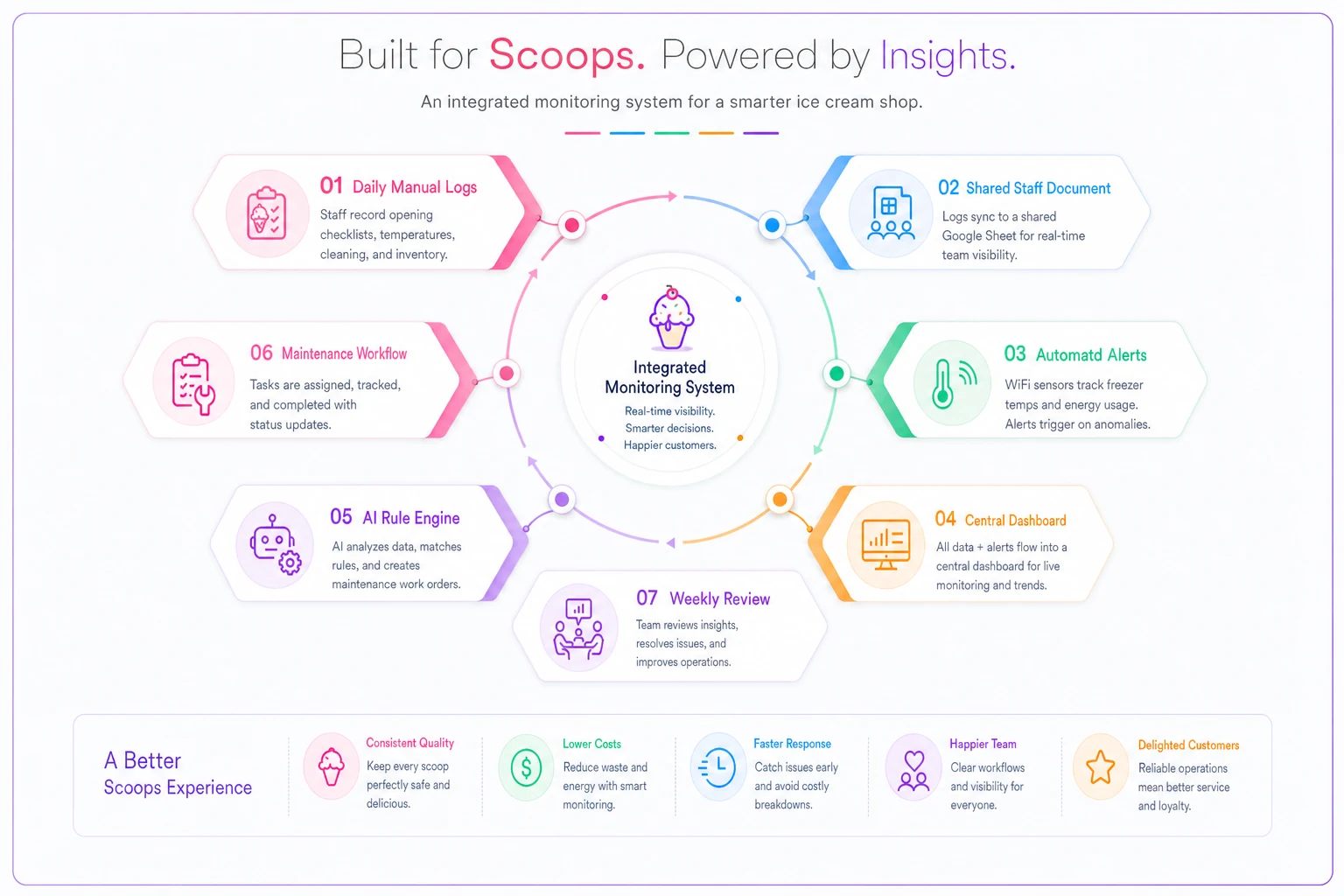
Operational platforms built around AI-assisted automation can centralize this entire process. Instead of juggling paper logs, phone alerts, and maintenance schedules across different systems, the right software consolidates equipment data, flags developing problems, and generates maintenance work orders automatically. The same platform handling your freezer maintenance checklist ice cream shop equipment needs can also track energy consumption trends and alert you before small issues turn into emergency repairs.
Weekly review meetings turn data into action. Spend 15 minutes every Tuesday reviewing equipment logs, energy consumption, and upcoming maintenance. Pattern recognition becomes automatic over time—you'll start noticing the walk-in always struggles after busy weekends, or the soft-serve machine acts up when humidity exceeds 70%.
The compound effect of systematic maintenance
A properly maintained freezer fleet operates 30-40% more efficiently than equipment that only gets attention when something breaks. For a typical shop, that's $500-800 monthly in energy savings, plus avoided emergency repairs, reduced product loss, and extended equipment lifespan.
The real value, though, is operational stability. When equipment runs predictably, you stop losing sleep about weekend breakdowns. Staff stops panicking at unusual sounds. Customers get consistent product quality because your soft-serve machines hold exact temperatures and your freezers don't develop hot spots.
The systematic approach also reveals upgrade opportunities. When you track energy consumption, you know exactly when replacing that 15-year-old display freezer makes financial sense. When you document repair frequency, you can justify buying backup equipment before the crisis.
Small ice cream shops typically underinvest in maintenance because the ROI seems unclear. But shops that implement comprehensive freezer maintenance systems usually see payback in 4-6 months through reduced emergency repairs alone. Factor in energy savings, extended equipment life, and prevented product loss, and you're looking at strong returns annually.
Either manage your equipment as an integrated system with daily diagnostics, preventive maintenance, and energy monitoring—or keep reacting to failures and watching profits melt away. The freezer maintenance checklist ice cream shop owners actually need isn't complicated. It just requires consistency and the right information flow to turn equipment management from a source of stress into something that quietly works in your favor.
Ready to scoop up efficiency and grow your shop?
Join hundreds of ice cream shops using Cremyly to boost productivity, reduce waste, and delight customers with faster service.