

Most scoop shops aren't missing data. They're drowning in it — a POS export here, a freezer temp app there, a messy inventory spreadsheet somebody updates when they remember. The problem isn't collection. It's that none of it talks to each other, nobody owns it, and when something does fire an alert, it's usually wrong enough that people learn to ignore it.
That last part is the quiet killer. A shop that gets three false low-stock alerts in a week stops trusting the fourth — and the fourth is the real one. So before you buy anything, add a sensor, or build a dashboard, you need a clear picture of where your shop actually sits on the maturity curve and what the next realistic step looks like. Not the fantasy endgame. The next step.
This roadmap is built specifically for a single-location ice cream shop — where you don't have a data analyst, you don't have 40 hours a week to babysit systems, and every tool you add has to earn its keep against the chaos of a Saturday rush.
The three tiers, and why most shops get stuck between them
There are really only three meaningful stages for a shop your size. Everyone wants to jump to the third. Almost nobody should.
| Tier | What data looks like | Who touches it | Typical failure mode |
|---|---|---|---|
| Manual | POS reports, handwritten temp logs, inventory counted by eye | Owner, end of night | Data exists but is never compared across days; decisions are memory-based |
| Hybrid | POS + a few digital logs + one weekly review ritual | Owner + one shift lead | Numbers get captured but alerts are noisy; people distrust the signals |
| Automated | Connected POS, sensors, reorder triggers, scheduled reconciliations | System does the watching, humans handle exceptions | Over-alerting, no ownership of flagged items, "automation" nobody audits |
The jump from Manual to Hybrid is where real money gets found. The jump from Hybrid to Automated is where most shops waste money — because they automate processes that were never clean to begin with.
Worth keeping in mind: automation doesn't fix a messy process, it scales it. If your inventory counts are sloppy at the Hybrid stage, automating reorders just means you're now wrong faster and more confidently.
Tier 1: Manual — and the required data items you cannot skip
A Manual shop isn't a bad shop. Plenty of profitable shops run here for years. But "manual" doesn't mean "random." The shops that eventually scale cleanly are the ones that, even while manual, capture a short, consistent list of data items every single day.
Keep your ice cream shop running smoothly.
Cremyly helps you manage every order, stock level, and staff shift with precision and ease.
- Real-time inventory tracking
- Order management dashboard
- Staff scheduling & shift coordination
No credit card required
At minimum, a Manual shop should be reliably capturing:
-
Daily net sales (not just gross — net of voids and comps)
-
Transaction count (so you can watch average ticket drift)
-
Opening and closing freezer temps for each unit, logged at set times
-
Waste/discard count by reason (melt, drop, expired, sample overrun)
-
Labor hours worked vs. hours scheduled
-
Top 5 flavors sold by volume
That's it. Six things. The mistake shops make here isn't failing to track enough — it's tracking too much inconsistently. A beautiful 30-column spreadsheet that gets filled out two days out of seven is worse than six fields filled out every day without fail.
Nail these six fields consistently before adding more columns or tools.
The deeper issue with Manual shops is comparison blindness. You might know yesterday's sales, but you can't feel the difference between "Tuesday was slow" and "Tuesdays have been trending down four weeks straight." The data is captured but never laid side by side, so trends hide in plain sight until they become cashflow problems.
If your POS tagging is a mess at this stage, fix that first — before anything else. Clean category and flavor tags are the foundation everything else sits on. We broke down exactly how to structure that in the operational data taxonomy for scoop shops. Get the tags right while you're still manual and every later tier gets dramatically easier.
Tier 2: Hybrid — where alerts start, and where they start lying to you
Hybrid is the stage most single-location shops should be aiming for. You've got digital temp logging, a POS that exports clean data, and a weekly review ritual where someone actually looks at the numbers together. You're not automated — you're consistent.
What breaks at Hybrid isn't data capture. It's signal quality. The moment you add a threshold alert — "tell me when mint chip drops below 3 tubs" — you've created the possibility of false alarms. And false alarms compound fast.
Acceptance-test checklist for any new alert
-
- [ ] Backtest it Pull the last 2–4 weeks of data. Would this alert have fired? How often? Were those fires real problems or routine noise?
-
- [ ] Actionability check When it fires, is there a specific action someone can take right then? ("Low stock" with no reorder path is not actionable.)
-
- [ ] Ownership check Is there one named person responsible for responding? Not "the team." A person.
-
- [ ] Timing check Does it fire with enough lead time to actually do something? A reorder alert that fires after the delivery window closed is useless.
-
- [ ] Silence test If this alert never fired for a week, would that itself be suspicious? If no, the threshold may be set to fire on normal variation.
-
- [ ] Snooze behavior Does a dismissed alert re-fire sensibly, or does it nag until people disable it entirely?
Any alert that fails two or more of these isn't ready. Tune the threshold or kill it. A shop with four trustworthy alerts beats a shop with twenty ignored ones every time.
If you want the underlying formulas and thresholds that make these alerts meaningful — the actual math tying sales, inventory, labor, and waste together — that's covered in the unified KPI architecture for scoop shops. The acceptance tests above are how you keep that architecture from becoming noise.
Ownership rules: the part everyone skips
This is where most roadmaps fall apart. You can have perfect data and perfect alerts, and it still collapses if nobody owns the response. In a single-location shop, ownership feels obvious — "well, it's all me" — but that's exactly the trap. When everything is the owner's job, nothing gets a reliable response, because the owner is also scooping, scheduling, and fixing the soft-serve machine.
Ownership has to be assigned at the data item level, not the I'm-too-busy level. A workable structure for a small shop:
-
Each required data item has one owner responsible for it being captured correctly and on time.
-
Each alert has one responder — the person who acts when it fires, which may differ from who owns the data.
-
Each weekly review has one driver — the person who runs the ritual, even if the owner attends.
-
Exceptions escalate on a clear rule if a flagged item isn't resolved within a set window (say, a freezer temp alert unaddressed for 30 minutes), it escalates to a second named person.
Shops that assign ownership by task instead of by role survive staff turnover far better. "The closing shift lead logs final temps" survives a person quitting. "Dave does the temps" does not.
Fallback contracts: what happens when the system is down
Automation introduces a dependency you didn't have when you were manual. The internet goes out, the sensor battery dies, the POS integration silently stops syncing at 2pm and nobody notices until closeout. A mature data setup plans for its own failure.
A fallback contract is a simple, pre-agreed rule for what the shop does when a data system fails. Write these before you need them — nobody designs good fallbacks mid-crisis.
-
If temp sensors go offline staff revert to manual temp checks every 2 hours, logged on paper, until the system is confirmed back. The manual log is the source of truth during the gap.
-
If the POS can't sync sales get tracked on the backup tally method, and the day gets reconciled manually that night rather than trusting the next sync to "catch up."
-
If an automated reorder trigger fails to send there's a weekly manual inventory eyeball as a backstop, so a missed auto-order can't go unnoticed for more than seven days.
-
If the weekly review gets skipped it rolls to a specific makeup day, not "whenever." A skipped review with no makeup rule becomes a permanently skipped review.
The more automated you get, the more important your manual fallbacks become. The shops that get burned by automation aren't the ones with bad systems — they're the ones who forgot how to run manually once the system did it for them.
When moving up a tier actually makes sense (and when it doesn't)
Not every shop should climb. The tier you should be at depends on your volume, your staffing, and honestly, your own appetite for maintaining systems.
Moving from Manual to Hybrid makes sense when:
-
You're consistently guessing at reorder timing and getting it wrong enough to notice
-
You can't answer "how did last Tuesday compare to the Tuesday before" without digging
-
You have at least one reliable shift lead who can own a review ritual
Moving from Hybrid to Automated makes sense when:
-
Your Hybrid process has been clean and consistent for several months — not weeks
-
You're spending real hours each week on tasks that are purely mechanical (counting, re-entering, copy-pasting between tools)
-
Your alerts already pass the acceptance tests manually, so you're automating a trusted process, not a hopeful one
Who should NOT automate yet:
-
Shops where inventory counts still vary wildly depending on who's counting
-
Shops where the "weekly review" happens maybe twice a month
-
Owners who want automation so they can stop looking at the numbers entirely
That last one is the most common and most dangerous reason. Automation should change what you look at — shifting you from raw data entry to handling exceptions — not eliminate your attention entirely. A shop that automates to stop paying attention has just built a very efficient way to miss problems.
A real scenario: the Hybrid shop that went alert-blind
A single-location shop doing somewhere around $18k–$22k in monthly summer sales had gone "all in" on digital. Freezer sensors, a POS with low-stock alerts, the works. On paper, very mature. In practice, staff had disabled notifications on the shared tablet because it buzzed constantly — mostly about cones and sprinkles that always restocked on schedule.
The cost showed up as waste and stockouts hiding underneath the noise. They'd run out of their two best-selling flavors on a holiday weekend because the real alerts were buried in the same stream as the junk ones. Melt-related waste was also creeping up because an intermittent freezer temp warning had been muted along with everything else.
The fix wasn't more technology. It was subtraction. They backtested every alert against the prior month, killed about two-thirds of them, assigned a single responder to the handful that survived, and wrote fallback rules for the temp sensors. Alert volume dropped from dozens a week to a handful — and crucially, people started trusting and acting on the ones that remained. Within a couple of months, holiday-weekend stockouts on top flavors largely stopped, and the muted-freezer problem couldn't happen again because the temp alert was now one of the few that actually fired.
Same tools. Better system. The maturity gain came from discipline, not spend.
A 6-month rollout tuned to single-location reality
You don't roll this out in a quarter if you're also running the shop. Here's a realistic pace that respects the fact that you have a day job — the day job being the shop itself.
-
Month 1 — Lock the Manual foundation. Nail the six required data items. Clean up POS tags. Don't add a single new tool. The goal is seven straight days of complete, consistent capture before you build anything on top.
-
Month 2 — Build the weekly review ritual. Same day, same time, same person driving it. Lay days side by side. You're training the habit of comparison, which is the single biggest jump from Manual to Hybrid. Still no new alerts.
-
Month 3 — Introduce 2–3 alerts, backtested. Pick only the alerts that pass every acceptance test. Start with the highest-stakes, lowest-noise one — usually freezer temps. Assign a named responder. Watch how often it fires and whether responses actually happen.
-
Month 4 — Assign ownership and write fallback contracts. Now that data and alerts are live, formalize who owns what and what happens when systems fail. This is paperwork, not tech. Do it before you automate anything.
-
Month 5 — Automate one mechanical task. Pick the single most repetitive data chore — often reorder triggers or end-of-night reconciliation — and automate just that one. Keep the manual fallback running in parallel so you can verify the automation against reality.
-
Month 6 — Audit, prune, and decide if you stop here. Review every alert again. Kill the ones that drifted into noise. Confirm fallback contracts actually work by testing one. Then make an honest call: are you done, or does one more automation step earn its keep?
For a lot of single-location shops, the right answer at month six is we're good here — and that's a legitimate finish line, not a failure to climb.
The system view
The reason this works as a progression and not a shopping list is that each tier depends on the one beneath it being solid. Clean tags make trustworthy alerts possible. Trustworthy alerts make ownership meaningful. Clear ownership makes automation safe. Fallback contracts make the whole thing survivable when a piece inevitably breaks.
Here's a simple visual of that progression.
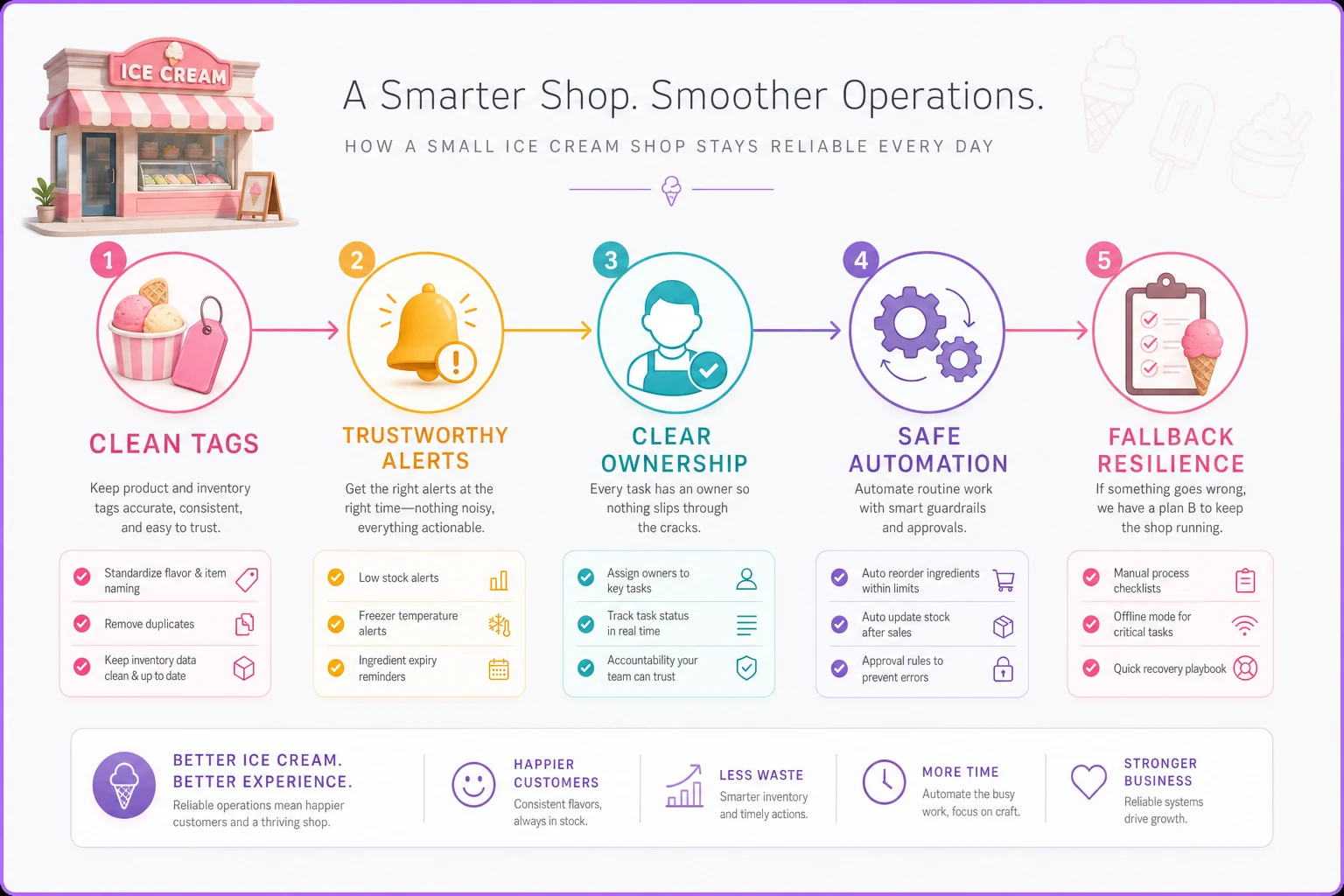
Shops get into trouble when they skip tiers — buying sensors before the tags are clean, automating reorders before the counts are reliable, turning on alerts before anyone's agreed to respond. The data maturity roadmap for an ice cream shop isn't about reaching the top. It's about never standing on a tier whose foundation you haven't actually poured yet.
Figure out where you really are. Get that tier genuinely clean. Then — and only then — look at the next step.
Ready to scoop up efficiency and grow your shop?
Join hundreds of ice cream shops using Cremyly to boost productivity, reduce waste, and delight customers with faster service.